
Building a Modern Teleport System Inside Shaiya
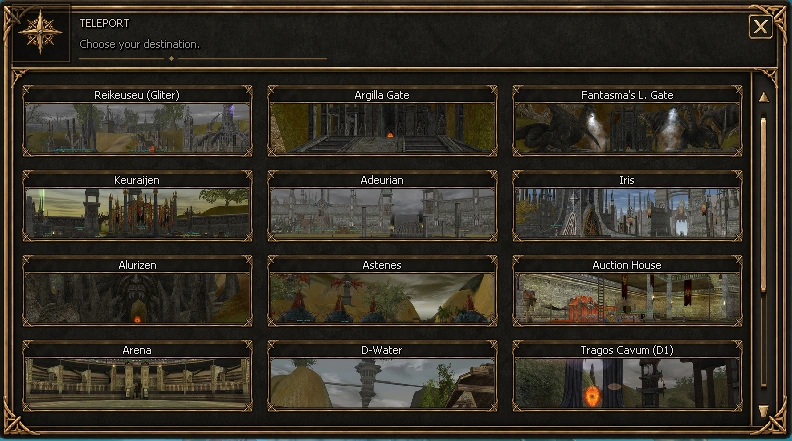
One of the clearest examples of Justice Online’s Custom Episode philosophy is the new Teleport interface built directly into the Shaiya client.
The original goal was simple: make destination selection faster to understand without making the game look like a different genre. The result is a compact dark-fantasy panel built around a three-column destination grid with twelve destinations visible at once and smooth scrolling for the full list.
The system is more than a visual reskin
- Destination cards use dedicated preview artwork so players can identify places visually.
- Mouse-wheel scrolling is animated instead of snapping between rows.
- The scrollbar thumb is draggable and uses the same scroll state as the destination hit-testing.
- Only the artwork needed for visible destinations is loaded, keeping the panel responsive.
- The final frame, close control and spacing were tuned to stay consistent with Shaiya’s fantasy visual language.
The teleport action still belongs to the game world rather than behaving like an external web menu. Selecting a destination uses the game’s teleport flow and a normal cast animation, so the convenience layer does not remove the feeling that the character is actually travelling.
There are currently 26 destination entries prepared for the system. Closed Alpha testing will help us verify that the ordering, scroll behaviour, destination naming and travel flow remain clear when players are moving quickly between real activities.
This is the type of change we mean when we call Justice Online a Custom Episode: preserve the game’s identity, then rebuild a weak interaction when there is a clear player-facing reason to do it.