Justice Online is a Custom Episode: Shaiya at the core, with systems built into the client and server by this project. If you know Shaiya from another server, this page lists what works differently here and where to find it in the game.
Getting around
Teleport panel: one window lists towns, gates, the Arena, the Auction House and dungeon entrances with map previews. You pick a destination instead of memorizing routes.
Inventory shortcuts: selling, blacksmith work, recreation, guild services, the vet and storage open from the inventory.
Rebuilt leveling quests: the quest chain was written for this server and leads through the maps and equipment steps in the intended order.
Knowing what drops
In-game drop list: select a monster and open its drops. Categories show their rates and expand into the actual items.
Drop Finder on the website: search an item or a monster and see the same live data in your browser.
Trading
Shared gold: all characters on an account use one gold balance.
Auction Board: a button on the bottom bar opens it anywhere. Listings, bids and results belong to the account, not to a single character.
Personal markets: a player shop shows the icons of its items above the shop name, so you can scan sellers without opening each one.
Justice Market: a peace-zone trading town without monsters, open to both factions and reached from the Teleport panel.
Item links in chat: link an item from your inventory into chat; others hover it to read the full tooltip, including stats and enhancement.
Progression
Battle Pass: a seasonal list of tasks completed through normal play. Each task has a Free reward, and Premium unlocks a second reward track for the whole account.
Bestiary: every monster you kill counts for its group, for the whole account. Each group has four tiers that give a lasting bonus and more damage against that group. Bestiary page
Auto Recreation: set minimum stat targets and the client uses Recreation Runes until the item reaches them.
Level 60 cap and a fixed enhancement ceiling keep the item chase readable.
Lucky Case: a chest on the website that can be opened every six hours. It uses the same reward pool as the in-game Justice Lucky Box and sends the reward to your Giftbox.
Comfort and readability
Quick Settings: HP bars, camera behavior, buff display, other characters, effects, market previews and elemental information in one panel. Settings are kept between restarts.
PvP record: kills, deaths, KDR, streak, frags and assists in the status window.
Launcher: updates the client, signs you in and lets you choose English, Turkish, Spanish or Filipino.
Minimap windows
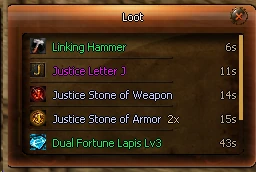
Loot: the bag button on the minimap (or /loot) lists the last items that entered your bags with their name color, count and time. Picking up the same item again raises its count instead of adding a row.
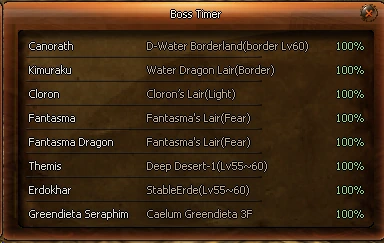
Boss Timer: the skull button (or /boss) lists the world bosses with their map, their health while alive, or the time left until they respawn.
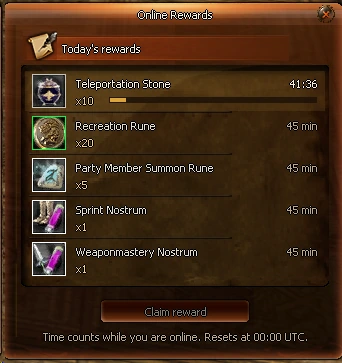
Online Rewards: the hourglass button shows today’s five rewards. Each one unlocks after 45 minutes online and is claimed in the window. Time counts while you are online and resets at 00:00 UTC.
Death Recap: after a PvP death a window lists who hit you, their level and class, their damage and its share of your health; the killer is shown in red. /recap opens it again.
LootBoss TimerOnline Rewards
Fair play
An integrated anti-cheat watches for abnormal play, and a player verification check can appear inside the client: you pick the requested faction and class from shuffled character images. Both exist so that kills, rank and drops are earned.
A note on Closed Alpha
These systems are live in the current client and are still being tuned with testers. Details can change before public launch; this page describes what each system is for rather than its numbers.
Common questions
What episode is Justice Online?
A Custom Episode. It is based on Shaiya but is not a stock EP4, EP5 or EP6 build.
Is gold shared between characters?
Yes. All characters on an account use the same gold balance.
How do I see what a monster drops?
Select the monster in game and open its drop list, or use the Drop Finder on the website.
Is the Battle Pass paid?
Every task has a Free reward. Premium adds a second reward track for the account.